
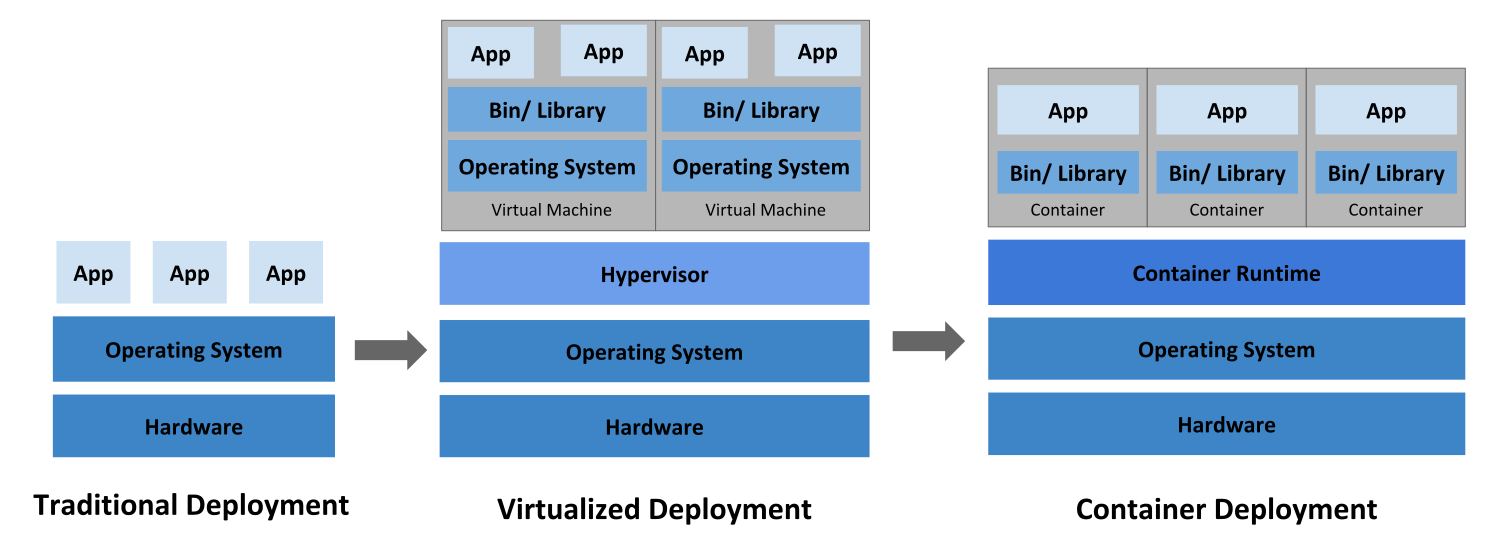
A container has its own filesystem, CPU, memory, process space, and more.
Docker
Docker analogy with OO: Image ~= Class, Container ~= Object
- Portable
- Packaged in a standard way
- Easy & repeatable deployment (reliable)
- Automated testing, packaging & integrations
- Support new microservice architectures
- Reduces platform compatibility issues
- Consistent environment
- Simple scaling
Docker Engine
Runtime & packaging tool
Docker Store/Hub
Online platform for hosting/sharing docker images
Kubernetes
Alternatives: Docker Swarm, Mesos, Rancher
Minikube: Lightweight Kubernetes implementation for running kubernetes on local machine
Container orchestrator:
- Start/Stop/Restart containers
- Establish communication among containers
- Scaling cluster
Kubernetes: an open-source platform designed to
- automate deploying
- scaling, load balancing and
- operating (logging, monitoring) application containers on a group or cluster of server machines
Kubernetes can run in different environments, such as bare metal, vm, cloud.
How to manage containers on a single host and across whole infrastructure?
Features
- Multi-Host Container Scheduling
- Scalability and Availability
- Flexibility and Modularization
- Plug & Play architecture
- Persistent Storage
- Maintenance
- Logging and Monitoring
- Secrets Management
Architecture
                                                    +-------------------------------+
                                                    |           Worker Node         |
                                                    | +---------+    +------------+ |
                                                    | | kubulet |    | kube-proxy | <----+
                                                    | +---------+    +------------+ |    |
                                                 +->| +---------------------------+ |    |
                                                 |  | |          Docker           | |    + Internet +
                                                 |  | |  Pod1     Pod2    Pod3    | |    |          |
               +------------------------------+  |  | |  +----+   +----+  +----+  | |    |          |
     kubectl   |          Master Node         |  |  | |  | C1 |   | C1 |  | C1 |  | |    |          v
      +        |                              |  |  | |  |  C2|   |  C2|  |  C2|  | |    |     User/Browser
 kubeconfig    | +--------------------------+ |  |  | |  +----+   +----+  +----+  | |    |
             +--+|       API Server         |<---+  | +---------------------------+ |    |
             | | +--------------------------+ |  |  +-------------------------------+    |
             | |                              |  |                                       |
   +------+  | | +-----------+ +------------+ |  |                                       |
   |      |  | | | Scheduler | | Controller | |  |  +-------------------------------+    |
   | etcd <--+ | |           | |  Manager   | |  |  |           Worker Node         |    |
   |      |    | +-----------+ +------------+ |  |  | +---------+    +------------+ |    |
   |      |    |                              |  +->| | kubulet |    | kube|proxy | <----+
   +------+    +------------------------------+     | +---------+    +------------+ |
                                                    | +---------------------------+ |
                                                    | |          Docker           | |
                                                    | |  Pod1     Pod2    Pod3    | |
                                                    | |  +----+   +----+  +----+  | |
                                                    | |  | C1 |   | C1 |  | C1 |  | |
                                                    | |  |  C2|   |  C2|  |  C2|  | |
                                                    | |  +----+   +----+  +----+  | |
                                                    | +---------------------------+ |
                                                    +-------------------------------+
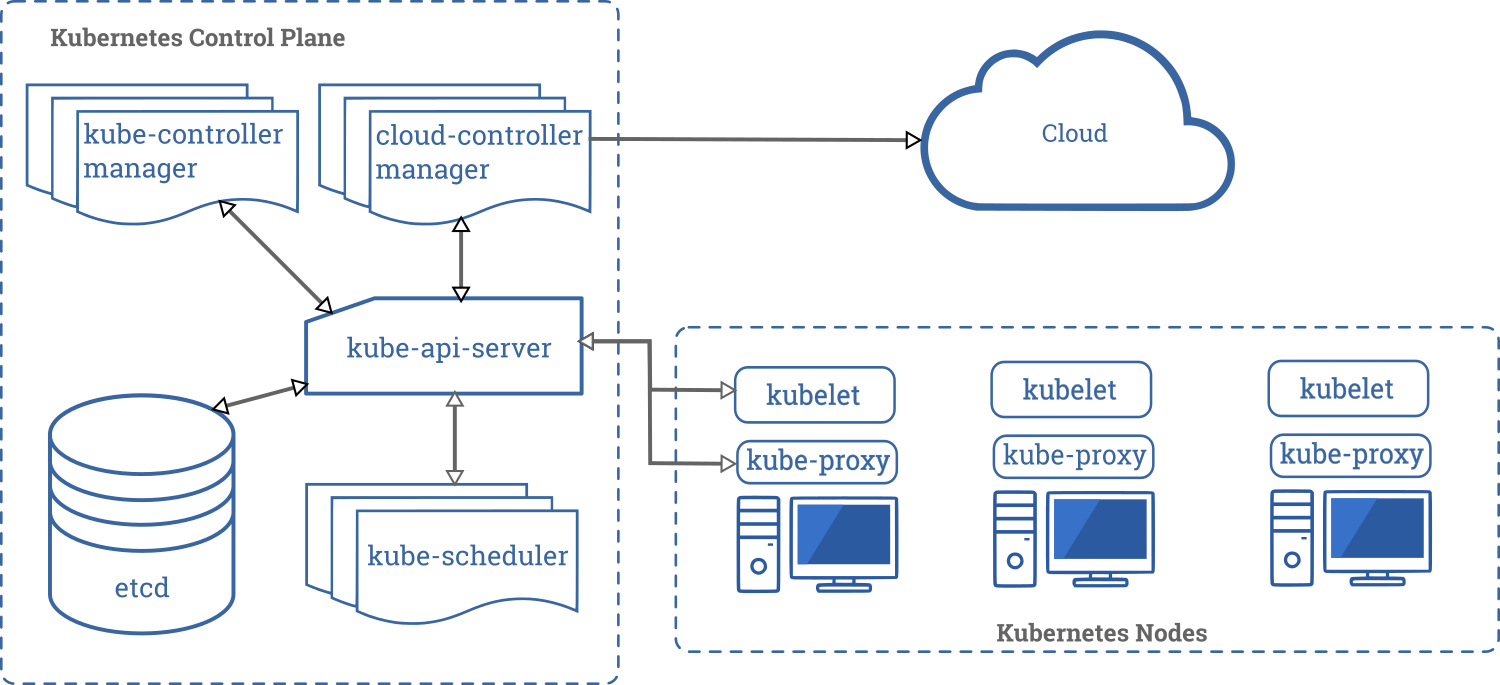
Master node
Responsible for the overall management of the cluster, doing this with 3 parts:
- Communication is done with the API Server (frontend to interact with kubernetes)
- Scheduling is done with the Scheduler: runs pots on specific nodes
- Controller Manager: node controller, replication, end-point, service
- etcd: key/value store and acts as kubernetes’ database
- kubectl: CLI application to interact with the master node (config via
kubeconfig: e.g. auth)
Worker Node
Can be exposed to the internet.
kubeletis the ‘kubernetes node agent’ communicates with pods to check health & state- Docker (pods: containers of an app & smallest deployable unit in kubernetes)
- Pod
- one running process on cluster which can be created, deployed & deleted.
- contains docker app, storage resources, unique IP
- states: pending, running, succeeded, failed, CrashLoopBackOff
- don’t interact with a pod directly, use controllers instead
- Can define
readinessandliveness-probe
- Pod
kube-proxy(network-proxy & load-balancer) routes packages from other resources which wants to communicate (e.g. from the internet)
Controllers
Reliability, scaling, load balancing
Kinds of Controllers: ReplicaSets, Deployments, DaemonSets, Jobs, Services
Controllers use Pod Templates to make actual pods.
- ReplicaSet: Ensures that a specific number of pods are running at all times (e.g. if one pod crashed, it will start a new one)
- Deployment: ensures that running pods align with the pod template written in YAML
- DaemonSets ensure that all nodes run a copy of a specific pod (e.g. logging,
monitoring) or a subset of nodes by setting a ‘node selector’
- Logging
- https://theagileadmin.com/2010/08/20/logging-for-success/
- Kibana & Elasticsearch
- Monitoring: node health, kubernetes health, application health & metrics
- cAdviser & heapster
- Prometheus linked to Grafana
- Logging
- StatefulSet
- Jobs run once and complete (e.g. cron job, nightly report, daily backup)
- Service provide network connectivity between pods with unique static IP (internal, external, load balancer)
Labels, Selectors, and Namespaces
- Labels: name a resource like pod, service, deployment (e.g. release: stable|canary, env: dev|stag|prod)
- Selectors help to select a subset of e.g. pods via
kubectl get pods --selector env=prod- equality- (
=,!=) - set-based (
in,notin,exists), e.g.ubectl get pods --selector 'myLabel in (val1, val2)'
- equality- (
- Namespaces: multiple virtual clusters backed by the same physical cluster.
- allows teams (with roles and responsibilities) to access resources
- different environments (dev, test, prod)
- different namespaces per customer project
Install on Lubuntu
- Download
VirtualBoxhere and install it withsudo install ./virtualbox-6.1_6.1.4-136177_Ubuntu_eoan_amd64 - Install kubectl binary with curl on Linux
- Install Minikube via direct download
- Run
minikube start - Run
virtualbox, it should show a runningminikubeinstance - Check with
kubectl get nodesif minikube and virtualbox are communicating with each other
Start a hello-world example app
- Start a hello-world
kubectl run helloWorld--image=karthequian/helloworld --port=80kubectl get [all|deployments|rs|pods]kubectl expose deployment helloWorld --type=NodePortminikube service helloWorld
- See config YAML with
kubectl get deploy/helloWorld -o yaml - Scale deployment:
kubectl scale --replicas=3 deploy/hw - Get details about a pod with
kubectl describe pods/helloWorld-84f776b79d-76c6p - Update image with
kubectl set image deployment/my-deployment helloworld=karthequian/helloworld:new- Check history:
kubectl rollout history deployment/helloWorld - Rollback:
kubectl rollout undo deployment/helloWorld(--to-revision=X)
- Check history:
- Debug
kubectl describe deployment helloWorldkubectl describe pods/helloWorld-84f776b79d-76c6p- check logs
kubectl logs helloWorld-84f776b79d-76c6p - Exec into pod:
kubectl exec -it helloWorld-84f776b79d-76c6p /bin/bash(-cfor specify container if multiple container in pod) - Use dashboard addon
minikube addons listminikube addons enable dashboard- Run:
minikube dashboard
Config-Map
Pass dynamic data to deployment.
kubectl get configmapskubectl create configmap helloWorldConfig
Secret
kubectl create secret generic myApiKey --from-literal=api_key=42424242
Deploy Kubernetes on production
- kubeadm
- pod network
- kops for AWS
Authorization
- ABAC: Attribute-based access control
- RBAC: Role-based access control
- Webhook: send request to other service which decides if user has access